

Guides
Paper library
Keep papers, notes, tags and PDFs in a local library that persists across sessions, and project it into Obsidian, Zotero or Notion.
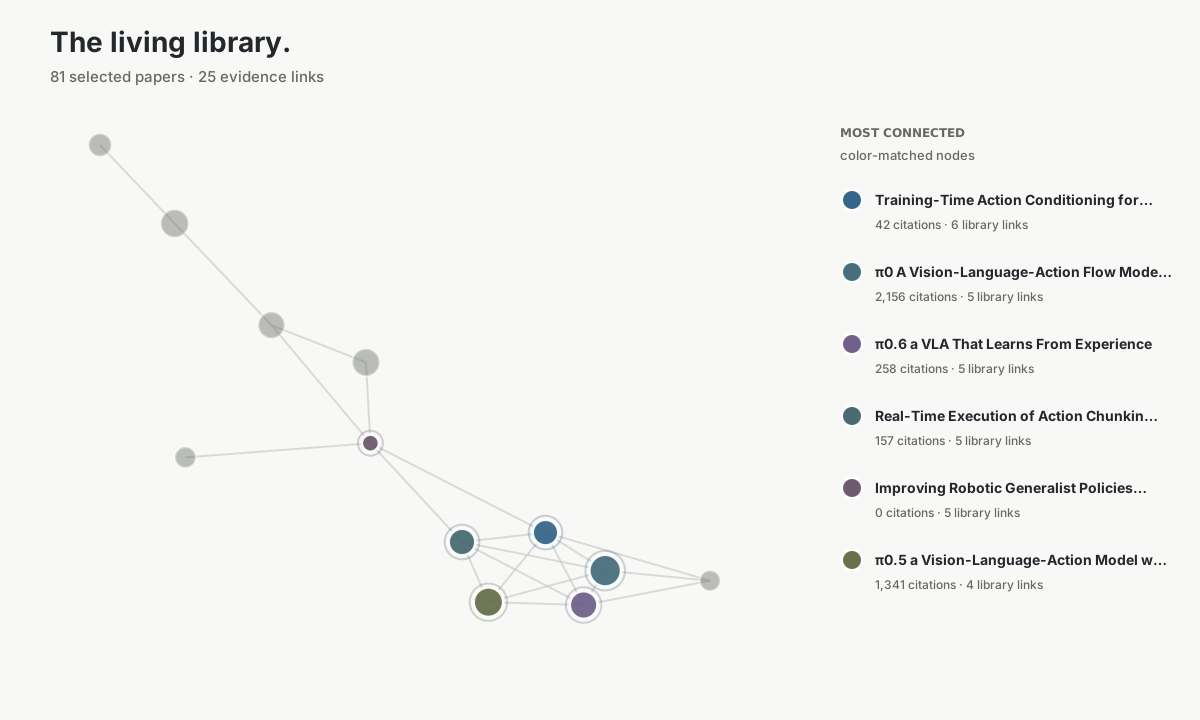
# Paper library When a conversation ends, the research stays in the library. It is a local SQLite database with full-text search. Each record keeps a stable identifier, the full author list and abstract, your notes and tags, the PDF path, and the IDs of the matching Zotero or Notion entries. Agents read and write it through `paper_library` in the research profile, and the command line shows the same records. <Figure src={graph} alt="Citation graph rendered from a local paper-library collection" caption="A citation graph drawn from a real local collection." /> ## Collections, notes and tags Papers are kept in collections, `default` unless you name another. `paper_library` supports these actions. | Action | What it does | |---|---| | `save` or `add` | Resolve one or more identifiers and store them with optional `notes` and `tags` | | `get` | Return one saved paper with its notes | | `list` | List a collection, with notes, tags and PDF paths | | `search` | Full-text search over saved titles, abstracts, authors and notes | | `update` | Replace the notes or tags of one paper | | `remove` | Permanently delete one paper from a collection | | `collections` | List collections and their sizes | | `export` | Write the collection as an Obsidian-compatible Markdown vault | Saving the same paper again adds new notes without duplicating them. Only `update` replaces a note. `download_paper` attaches the PDF to the matching record, so a paper and its file stay together. A request such as *save these three to the retrieval collection, tag them baseline and note why each matters* is enough for the agent to call `save` with the right identifiers. ## Where files are kept ```text ~/.scholar-mcp/ ├── papers/ persistent PDFs ├── kb/ │ ├── library.sqlite3 authority + FTS5 + sync state │ └── *.jsonl compatibility snapshots └── vault/ Markdown projections and wikilinks ``` `SCHOLAR_DATA_DIR` moves the whole tree. `SCHOLAR_KB_DIR` and `SCHOLAR_DOWNLOAD_DIR` move the library and the PDFs separately. Older JSONL collections move into SQLite automatically and stay as snapshots. ## Command line The same records are available in a terminal. [Command line](/scholar-mcp/cli/#library) lists every subcommand. ```bash scholar-mcp library doctor scholar-mcp library list --collection retrieval scholar-mcp library search "contrastive pretraining" --collection retrieval ``` ## Connectors Each connector records external IDs, versions and content fingerprints, so unchanged papers are not published twice. <Tabs syncKey="connector"> <TabItem label="Obsidian"> Obsidian needs no login. Each paper becomes one Markdown note, plus an index for the collection, linked with wikilinks and written straight into the vault. ```bash scholar-mcp library export obsidian --collection retrieval --path /path/to/vault ``` `--link-citations` fetches reference lists and links notes along real citations. With `SCHOLAR_OBSIDIAN_VAULT` set, the vault stays in sync, and every save, update and download refreshes it. </TabItem> <TabItem label="Zotero"> Zotero receives items, collections and tags, with a separate Scholar research note under each paper. Set `ZOTERO_API_KEY` and `ZOTERO_LIBRARY_ID`, and for a group library or the local API also `ZOTERO_LIBRARY_TYPE` or `ZOTERO_API_BASE`. ```bash # Dry run: prints the plan scholar-mcp library sync zotero --collection retrieval # Performs the writes scholar-mcp library sync zotero --collection retrieval --apply ``` `--zotero-collection-key` targets an existing Zotero collection. </TabItem> <TabItem label="Notion"> Notion receives a reading list with a readable summary and editable research notes, even when the database has only a title column. Set `NOTION_API_KEY` and `NOTION_DATA_SOURCE_ID`. ```bash # Dry run: prints the plan scholar-mcp library publish notion --collection retrieval # Performs the writes scholar-mcp library publish notion --collection retrieval --apply ``` Your own `Notes` property is never overwritten. </TabItem> </Tabs> <Aside type="note" title="Dry run by default"> Zotero sync and Notion publish only print a plan until you add `--apply`. Obsidian export writes local files directly. </Aside> ## Your edits are read back Edit notes where you read. After an export, write in the *Research notes* section or under *Notes* in the Markdown file, or edit the research note Scholar created in Notion. The next library read, whether `get`, `list`, `search` or `update`, picks up your edits first, and the agent continues from them. When both sides changed, your version wins, even if you cleared the note. An untouched Markdown file never rolls back a newer draft in the library. Conflicts and read errors are listed in the response as `note_conflicts` and `note_errors`. Connector credentials can be kept in the system's encrypted credential store. Command arguments and environment variables take precedence, and credentials are never written to the library.When a conversation ends, the research stays in the library. It is a local SQLite database with full-text search. Each record keeps a stable identifier, the full author list and abstract, your notes and tags, the PDF path, and the IDs of the matching Zotero or Notion entries. Agents read and write it through paper_library in the research profile, and the command line shows the same records.
Collections, notes and tags
Section titled “Collections, notes and tags”Papers are kept in collections, default unless you name another. paper_library supports these actions.
| Action | What it does |
|---|---|
save or add |
Resolve one or more identifiers and store them with optional notes and tags |
get |
Return one saved paper with its notes |
list |
List a collection, with notes, tags and PDF paths |
search |
Full-text search over saved titles, abstracts, authors and notes |
update |
Replace the notes or tags of one paper |
remove |
Permanently delete one paper from a collection |
collections |
List collections and their sizes |
export |
Write the collection as an Obsidian-compatible Markdown vault |
Saving the same paper again adds new notes without duplicating them. Only update replaces a note. download_paper attaches the PDF to the matching record, so a paper and its file stay together.
A request such as save these three to the retrieval collection, tag them baseline and note why each matters is enough for the agent to call save with the right identifiers.
Where files are kept
Section titled “Where files are kept”~/.scholar-mcp/├── papers/ persistent PDFs├── kb/│ ├── library.sqlite3 authority + FTS5 + sync state│ └── *.jsonl compatibility snapshots└── vault/ Markdown projections and wikilinksSCHOLAR_DATA_DIR moves the whole tree. SCHOLAR_KB_DIR and SCHOLAR_DOWNLOAD_DIR move the library and the PDFs separately. Older JSONL collections move into SQLite automatically and stay as snapshots.
Command line
Section titled “Command line”The same records are available in a terminal. Command line lists every subcommand.
scholar-mcp library doctorscholar-mcp library list --collection retrievalscholar-mcp library search "contrastive pretraining" --collection retrievalConnectors
Section titled “Connectors”Each connector records external IDs, versions and content fingerprints, so unchanged papers are not published twice.
Obsidian needs no login. Each paper becomes one Markdown note, plus an index for the collection, linked with wikilinks and written straight into the vault.
scholar-mcp library export obsidian --collection retrieval --path /path/to/vault--link-citations fetches reference lists and links notes along real citations. With SCHOLAR_OBSIDIAN_VAULT set, the vault stays in sync, and every save, update and download refreshes it.
Zotero receives items, collections and tags, with a separate Scholar research note under each paper. Set ZOTERO_API_KEY and ZOTERO_LIBRARY_ID, and for a group library or the local API also ZOTERO_LIBRARY_TYPE or ZOTERO_API_BASE.
# Dry run: prints the planscholar-mcp library sync zotero --collection retrieval
# Performs the writesscholar-mcp library sync zotero --collection retrieval --apply
--zotero-collection-key targets an existing Zotero collection.
Notion receives a reading list with a readable summary and editable research notes, even when the database has only a title column. Set NOTION_API_KEY and NOTION_DATA_SOURCE_ID.
# Dry run: prints the planscholar-mcp library publish notion --collection retrieval
# Performs the writesscholar-mcp library publish notion --collection retrieval --apply
Your own Notes property is never overwritten.
Your edits are read back
Section titled “Your edits are read back”Edit notes where you read. After an export, write in the Research notes section or under Notes in the Markdown file, or edit the research note Scholar created in Notion. The next library read, whether get, list, search or update, picks up your edits first, and the agent continues from them.
When both sides changed, your version wins, even if you cleared the note. An untouched Markdown file never rolls back a newer draft in the library. Conflicts and read errors are listed in the response as note_conflicts and note_errors.
Connector credentials can be kept in the system’s encrypted credential store. Command arguments and environment variables take precedence, and credentials are never written to the library.